How to Adjust Your Camera Recording Rules
If your camera is capturing too many clips, you can fine-tune its recording rules to cut down on unnecessary footage. This article walks you through where to find these settings and which adjustment fits your situation.
The fix: Increase the minimum delay between clips. This setting controls how much time must pass before a new clip starts recording, so continuous activity is captured as fewer, longer clips instead of many short ones.
The fix: Adjust the ground zone or tripwire for the video analytics rule. This is the designated area that triggers a recording when an object stays within its boundaries for an extended period. Narrowing or repositioning this zone helps ensure recordings are only triggered by meaningful activity.
The fix: Adjust the recording timeframe so the camera only records during the hours that matter to you.
How to Access Recording Rules
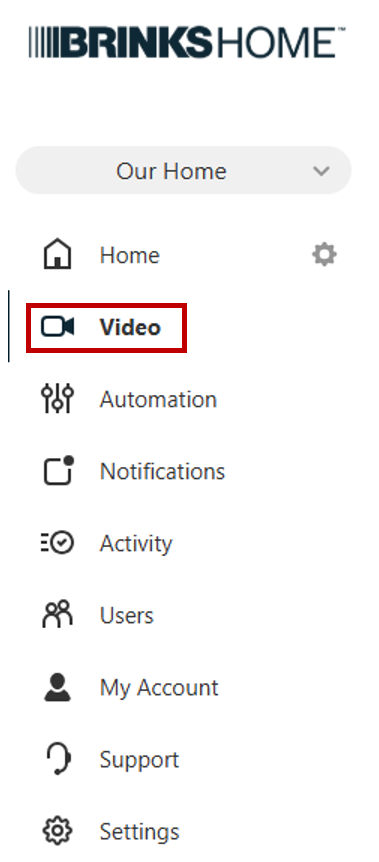
- From the left navigation pane, select Video.
- Click Recording Rules from the top banner.

- Scroll down to the Rules section and locate the camera that's generating excessive clips.
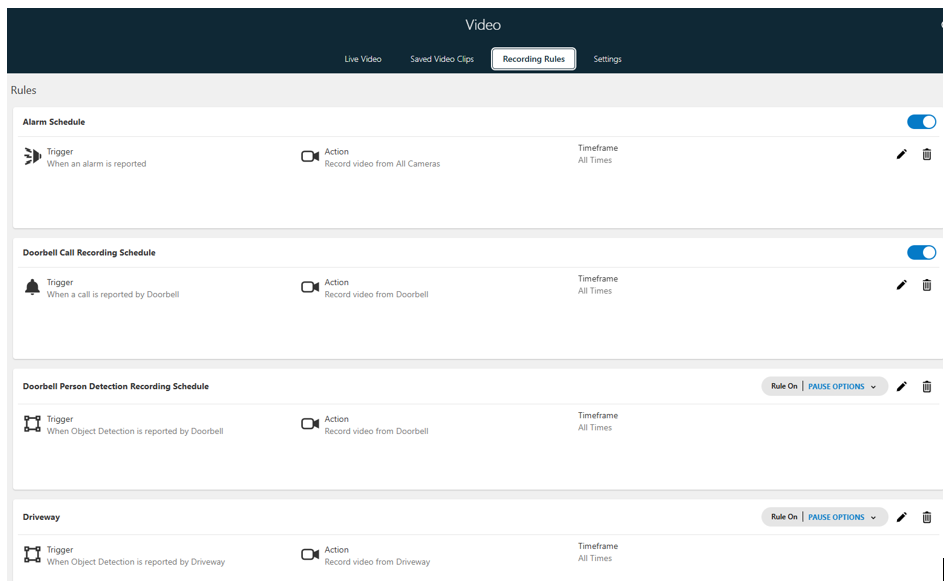
- Select the pencil icon next to that camera to edit its rule.
Common Causes of Excessive Recordings
1. Clips Are Grouped Too Close Together
Is this you? You're seeing multiple clips of the same ongoing activity — like watering plants, carrying groceries from the car, or mowing the lawn — recorded back-to-back as separate clips.The fix: Increase the minimum delay between clips. This setting controls how much time must pass before a new clip starts recording, so continuous activity is captured as fewer, longer clips instead of many short ones.
2. The Detection Zone Is Too Broad or Improperly Placed
Is this you? You're getting clips triggered by things with no real value — leaves blowing across the grass, trees swaying in the wind, or squirrels running through the yard.The fix: Adjust the ground zone or tripwire for the video analytics rule. This is the designated area that triggers a recording when an object stays within its boundaries for an extended period. Narrowing or repositioning this zone helps ensure recordings are only triggered by meaningful activity.
3. Recordings Are Happening Outside the Hours You Care About
Is this you? You only need footage during specific windows — for example, when kids get home from school, when the dog sitter arrives, or outside of work hours.The fix: Adjust the recording timeframe so the camera only records during the hours that matter to you.